Baby Puzzle Games for Toddlers
- 4.7
- Rating
- 10.00M
- Installs
- Free
- Price
 Analysis by App-foxy
When I want a quiet activity for a young child that feels more like play than a lesson, Baby Puzzle Games for Toddlers is the kind of title I would try first. It is an educational puzzle game from Bebi Family: preschool learning games for kids, designed for pre-k children between two and five years old. The central idea is simple: children complete picture puzzles through touch, matching pieces and gradually turning a scattered image into something recognizable.
That simplicity is the main reason it works. A child does not need to understand a menu full of rules before starting. The puzzles offer a clear visual goal, and the age range gives parents a useful sense of who the game is intended for. I see it as a short, supervised activity for developing attention, visual matching, and basic problem-solving rather than as a complete preschool curriculum.
The game is free to install and carries an Everyone content rating. It has reached over 10 million installs, with a 4.7 average from around 43 thousand ratings and roughly 5.4 thousand written reviews. Those figures suggest that it has found a substantial audience, but popularity alone does not decide whether it belongs on your child’s device. The more important questions are how it feels during ordinary play, whether the spending model is comfortable for your family, and whether the puzzle format matches your child’s temperament.
You May Also Like

 Blood Strike: 2.5 Anniversary
Blood Strike’s Loadouts Turn Every Drop Into a Tactical Gamble
A close look at Blood Strike’s custom loadouts: how fast access to signature weapons reshapes its battle royale rhythm, rewards preparation, and narrows the gap between fights.

 Pandora - Music & Podcasts
Pandora’s Music Is Easy to Start, but Harder to Recover
Pandora’s strength is its low-effort path from a seed to a station. Its weak spot is how much confidence it asks you to place in connection, setup, and quiet recovery.

 8 Ball Pool
 Is Built on Rivalries, Rematches, and Routine
A close look at the rivalries, rematches, shared routines, and unanswered safety questions that turn a quick pool match into a persistent mobile community.

 Samsung Music
’s Quiet Strength Is Playing What You Already Own
Its reach comes less from spectacle than from dependable access to a personal library. That simplicity is both the app’s strongest retention engine and its ceiling.

 AccuWeather: Weather Radar
AccuWeather Review: A Quick, Clear Forecast for Everyday Decisions
For everyday plans, the best forecast is the one you can understand quickly. AccuWeather makes rain timing, radar, and local conditions easy to act on, with a few trade-offs.

 Hill Climb Racing
Why Hill Climb Racing Still Turns Crashes Into One More Run
A tiny car, a bumpy hill and one more upgrade: Hill Climb Racing keeps resurfacing because its simple chaos makes every near-miss feel personal.
More From Our News Desk
View All News


How the puzzle experience works for young children
I find the puzzle format easiest to judge by watching how a child handles the first few taps: do they pause to compare the picture, try a placement, and stay curious when it takes another attempt? Starting beside them lets me notice whether the screen interaction feels intuitive or whether they need a little coaching. That first shared session also gives me a useful baseline for thinking about speed expectations during everyday play.
A gentle starting point for early learners
Jigsaw puzzles can be frustrating for toddlers when the pieces are small, the picture is unclear, or the child has to manage too many decisions at once. This game’s appeal is that it reduces the task to a familiar touch interaction. The child can focus on recognizing shapes and images instead of reading instructions or remembering complicated controls.
For a two-year-old, I would treat the first sessions as guided play. I would sit nearby, name the objects in the picture, and ask simple questions such as “Where does this piece go?” or “Can you find the matching color?” That turns the same puzzle into a conversation about vocabulary and observation. Older preschoolers may be able to work more independently, especially when they already understand how a jigsaw works.
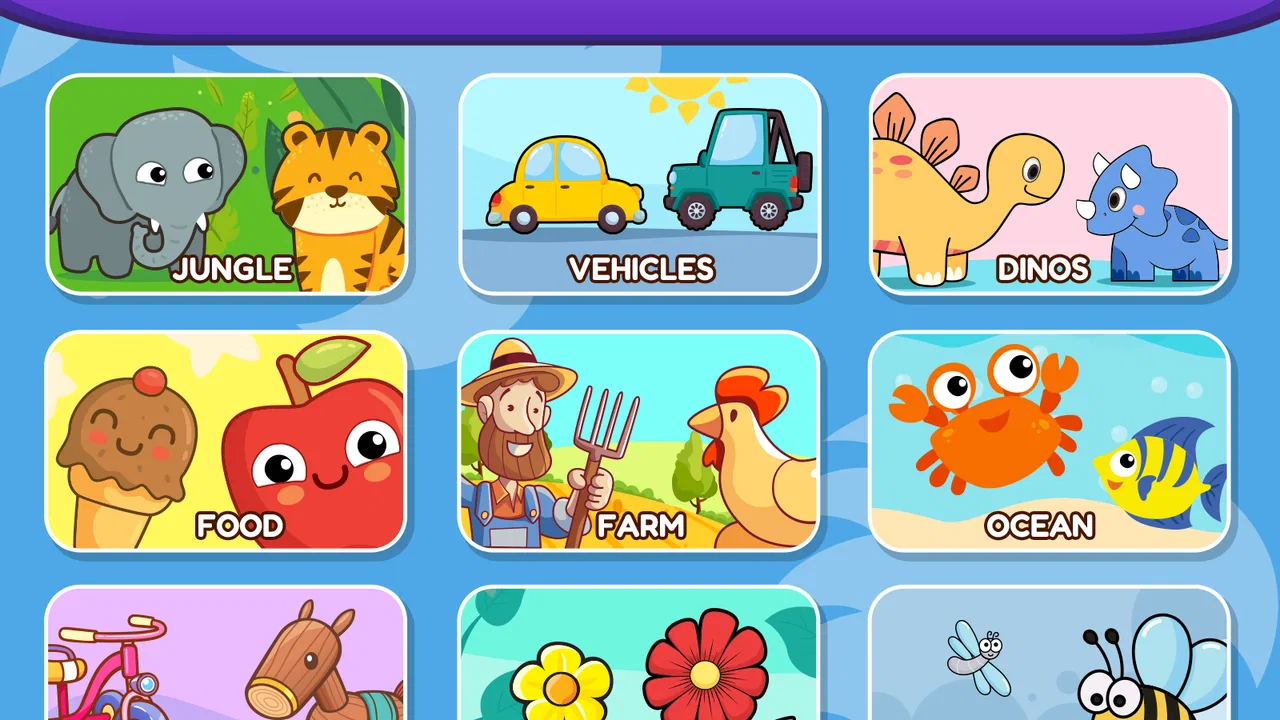
The collection contains more than 100 puzzle games, so the format has enough breadth to support repeated visits. That does not mean every child will enjoy all of them equally. Some children like repeating a familiar picture until they feel confident; others want constant novelty. The larger selection is most useful when an adult chooses puzzles according to the child’s current attention span rather than simply handing over the device and expecting uninterrupted play.
What children can practice without feeling tested
The educational value is strongest in small, practical skills. A child has to compare a piece with part of an image, notice orientation or placement, and persist when the first attempt is wrong. Those are modest abilities, but they are appropriate for preschool play. I also like that a puzzle gives the child a visible ending: the picture becomes complete, providing a natural sense of accomplishment.
One useful routine is to let the child attempt a piece before helping. If I immediately point to the correct location, the activity becomes following instructions. If I wait a little, the child gets a chance to scan the image and make a decision. When help is needed, I would offer one clue at a time instead of completing the puzzle for them. This makes the game more valuable as a thinking exercise.
Parents should also remember that a digital puzzle does not replace handling physical pieces. A real jigsaw develops hand control, spatial awareness, and patience in a different way. The app is better viewed as a portable supplement for moments when a physical puzzle is impractical, such as waiting rooms, travel, or a short quiet period before bedtime.
A realistic everyday use case
Imagine a parent preparing dinner while a preschooler needs a calm activity nearby. I would choose a puzzle that the child has already seen, start it together, and agree on a short stopping point before cooking begins. The child can work through a few pieces, while the parent remains close enough to help with navigation or a difficult placement. This is more realistic than treating the game as a babysitter for an extended period.
Another good moment is during travel. A tablet or phone can be easier to carry than a box of loose puzzle pieces, and a familiar visual activity may help a child settle during a wait. I would test the game at home first, because a child who needs frequent adult assistance may not find it convenient in a busy public setting. The best use is planned, brief, and connected to the child’s mood.
Progress without unnecessary pressure
For this age group, I prefer puzzle games that do not make children feel they are failing. A toddler may need several attempts to understand where a piece belongs, and an adult’s reaction matters as much as the app’s response. I would praise careful looking and trying again, not just speed. That keeps the activity focused on discovery rather than performance.
The large puzzle collection can support a gentle progression created by the parent. Start with pictures the child recognizes, then move toward scenes that require more observation. A child who becomes tired should be allowed to stop before the activity turns into a struggle. More content is useful only when it gives families choices; it should not become a reason to push a child through puzzle after puzzle.
This is also where the game may not suit every household. Children who prefer open-ended drawing, music, pretend play, or physical movement may lose interest quickly. A child who is already comfortable with traditional jigsaws may find a very simple digital version less satisfying than a hands-on puzzle with a larger challenge.
What the spending model means in practice
The game is free, but it includes in-app purchases ranging from $1.99 to $4.99 per item. That is the part I would examine before giving a young child unsupervised access. A child may not understand that tapping a purchase control can involve real money, so the adult should manage the device’s purchase settings and decide in advance whether any optional spending is acceptable.
The store summary presents the experience as ads-free, which is an important part of the appeal for a children’s game. Even so, I would still look at the screen myself before handing over the device, particularly if the child is using a shared phone or tablet. A parent’s own check is worthwhile because a calm interface and a clearly understood purchase route are separate concerns.
I see the purchase structure as reasonable only when the family is comfortable with the free experience and treats optional items as a deliberate choice. I would not buy anything simply to keep a child occupied or to avoid a moment of frustration. If the available free content already provides enough variety, spending may add little value. If a child repeatedly returns to the same activity and the family wants more material, a small optional purchase may make sense, but it should remain the adult’s decision.
Fairness in a non-competitive game
There is no meaningful competitive fairness question in the usual multiplayer sense here. A child is not competing against another player for a ranking or prize. The more relevant issue is fairness between the game and the child: does the experience reward observation and persistence, or does it create pressure to spend, rush, or keep playing?
For my purposes, the strongest version of this game is one where the child can enjoy the puzzle itself without feeling that progress depends on a purchase. Parents should watch the first few sessions and notice whether the child can move naturally from one activity to another. If the game becomes a source of repeated requests for paid items, it may be better to limit access or choose a different puzzle option.
Compared with physical jigsaw puzzles, the digital version is cleaner and more portable. It also avoids lost pieces and makes it easy to offer a new picture immediately. The trade-off is that the device controls the experience, and the child does not receive the same tactile feedback as when turning cardboard pieces in their hands. Compared with broad educational apps, this title is narrower but more focused. It is a better fit when the child specifically enjoys matching and completing pictures, not when a parent wants reading, counting, drawing, and open-ended activities in one place.
Compared with free-form play, the puzzle format gives clearer structure but less imagination. That is not a flaw; it simply defines the right use. I would choose it for a short concentration exercise and choose blocks, crayons, or a physical puzzle when I wanted richer hands-on exploration.
Age, device, and practical expectations
The intended audience is pre-k children aged two, three, four, and five, while the content rating is Everyone. I would still make the final decision based on the individual child. Two children of the same age can have very different abilities with touch controls, attention, and frustration. Younger toddlers may need an adult to explain the interaction, while older preschoolers may want a faster rhythm or more complex challenges.
The listed minimum operating system is Android 6.0, and the current version is 15.01.14. That makes the compatibility detail useful for families using an older Android device, although I would still check the device’s own store page before installing. Version information can change over time, and an older phone may offer a less comfortable screen or slower response even when it meets the operating-system requirement.
I would also prepare the device before play. Turn down notifications, use a comfortable brightness level, and keep the phone or tablet on a stable surface if the child is likely to tap enthusiastically. These small steps matter more than they sound: interruptions can make a simple puzzle feel confusing, while an awkward viewing angle can lead to unnecessary frustration.
Questions parents may still have
Is it suitable for independent play? Sometimes, but I would not assume that from the age label alone. A child who already handles touch controls and understands matching may manage a short session independently. A younger child may need help choosing a puzzle, recovering from an accidental tap, or understanding what to do next. I would begin with shared play and gradually step back.
Can it replace physical puzzles? No, and I would not use it that way. It offers convenience and a tidy screen-based alternative, but physical puzzles provide tactile resistance and a different kind of coordination. Using both formats gives the child a broader experience.
Will it suit a child who gets upset when a piece does not fit? It may, provided the adult keeps the pace relaxed and helps the child treat mistakes as part of the activity. If the child repeatedly becomes distressed, the title is not the right tool for that moment. A simpler picture, a physical puzzle with larger pieces, or a non-puzzle activity may be a better choice.
Does free mean the family will never need to think about spending? No. The game is free to install, but optional in-app purchases cost between $1.99 and $4.99 per item. I would handle those settings before the child plays and avoid presenting purchases as a reward for finishing puzzles.
Is the game a complete educational program? I would not describe it that way. Its strength is focused puzzle practice, with opportunities to talk about images, colors, shapes, and persistence. Families looking for a wider set of preschool lessons should use another educational resource alongside it rather than expecting this one format to cover every learning area.
My trust verdict after weighing the trade-offs
My overall view is positive, with clear limits. Baby Puzzle Games for Toddlers is a sensible choice for families who want a simple, child-friendly puzzle activity that can travel easily and fit into short sessions. The large collection gives it more staying power than a single digital puzzle, and the educational benefit comes naturally from matching, noticing, and trying again rather than from formal quizzes.
I would recommend it most to parents of preschoolers who already enjoy pictures and sorting activities, especially when a portable alternative to a physical jigsaw is useful. I would skip it for a child who needs active movement, creative drawing, or a much deeper challenge. I would also avoid leaving purchase decisions to the child, even though the game itself is free to install.
After considering the free entry point, the optional spending range, the ads-free store summary, and the absence of competitive pressure, I see it as a fair low-commitment option when used with ordinary parental supervision. The best results come from treating it as one small part of a child’s playday. My practical recommendation is to play the first few puzzles together, set a clear stopping point, and let the child’s interest—not the size of the puzzle library—decide whether it earns a regular place on the device.
FAQs for Baby Puzzle Games for Toddlers
01What is Baby Puzzle Games for Toddlers?
Baby Puzzle Games for Toddlers is a collection of simple, colorful puzzles designed for young children. The activities generally focus on matching shapes, animals, objects, and familiar pictures, helping toddlers explore basic problem-solving in a playful way. Its child-friendly interface uses large buttons and straightforward interactions, so children can begin playing with limited assistance from an adult.
02What age group is Baby Puzzle Games for Toddlers suitable for?
The game is mainly intended for babies, toddlers, and preschool-age children who are beginning to recognize shapes, colors, animals, and everyday objects. The difficulty is usually gentle, making it appropriate for early learners rather than older children looking for complex puzzles. Parents should still choose activities according to their child’s development and supervise younger players when necessary.
03Does Baby Puzzle Games for Toddlers work offline?
Many of the core puzzle activities can typically be played without a continuous internet connection once the application has been installed. This makes it convenient for travel, waiting rooms, or situations where Wi-Fi or mobile data is unavailable. However, advertisements, updates, additional content, or links to other features may require an internet connection, depending on the version installed.
04Is Baby Puzzle Games for Toddlers safe and easy for children to use?
The game is designed with a simple layout, bright visuals, and large touch targets that are easier for small hands to use. Even so, parents should review the application’s advertising, privacy, and parental-control settings before handing over the device. Some versions may include external links, in-app purchases, or ads, so supervision is recommended, especially for very young children.
05Does Baby Puzzle Games for Toddlers support learning and development?
The puzzles can support early learning by encouraging children to identify objects, compare shapes, remember visual patterns, and practice hand-eye coordination through touch interactions. It should be viewed as an entertaining educational supplement rather than a replacement for active play, books, conversation, and hands-on learning. Short sessions with parental encouragement can make the experience more useful and engaging.
Pros
- Simple controls are easy for toddlers to understand without help.
- Bright visuals and playful sounds help maintain young children’s attention.
- Puzzle difficulty is suitable for developing early problem-solving skills.
- Short activities work well for quick play sessions.
- Offline access makes it useful during travel or without Wi-Fi.
Cons
- Some puzzles may feel repetitive after extended play.
- Sound effects can become distracting in quiet environments.
- Limited challenge may not suit older preschoolers.
- Ads or locked content may interrupt the play experience.
- Small interface details can be difficult for very young users to tap.

Baby Puzzle Games for Toddlers
Gallery